 |
 Cherry Pits 2 & 3 Cherry Pits 2 & 3 |
Wednesday, September 1, 2010

Thursday, August 19, 2010
Cherry Pits


The first ArtRage image is just paint in layers. The second image has a photo of cherry pits that I took with my camera some time in the spring added to the first. I think I will start a new series of cherry pits and stems.
I just looked back at the images on the first page of this blog. I realize that I have been all over the place in terms of content and technique. I have not been working with any consistency for some time now. I am glad that I like the cherry pits image. I am inspired by the photos and want to create more of these.
Sunday, March 28, 2010
Recent Abstracts in ArtRage 3


I have finally gotten back to my home computer to make a few images in ArtRage. Here are a few abstracts that I came up with.
Monday, January 4, 2010
Brown Shoulder Cat

Another try at this image with a different background and erased out layers using blends. The cat is brown, more like the original image.
Sunday, December 27, 2009
Shoulder Cat Again

Shoulder Cat Blue and Yellow
Another try at Shoulder Cat. Lots of fussing around with this one. I started out with an abstract background and imported the first Shoulder Cat Blue into a layer. Many erasures later...I got this one. Not as harsh as the last one. I like the blue lines of the face on the yellow background.
Monday, December 21, 2009
Harsher Shoulder Cat

Getting rid of most of the color in this one. The cat is harder to see. The face is getting harsher as well.
Another Try

Shoulder Cat Blue 2
Cropped this one a bit and changed the blends. Added some textures to it too.
Sunday, December 20, 2009
Shoulder Cat With ArtRage 3

Shoulder Cat Blue
This is a softer, lighter shoulder cat and figure. Trying my hand at watercolor. My computer is old and I still use the mouse to draw. I find the speed of the watercolor tools to be a bit dragging, but I am happy with the effects. The cat is an altered photo using the blend mode with two layers. The first cat layer is in highlight and the second is in difference. The figure is watercolor and pencil. I am also placing the screen capture for this image.

Saturday, December 19, 2009
ArtRage3 First Try

This is my first try using text with ArtRage3 Studio Pro. It has taken me a while to figure out the Selection Tool. Once I activated the shape, I had a hard time figuring out how to get rid of it. I think I have a handle on it now. The text feature is finally here! I had had to use Paint before and import the text image that way. I am so glad to see it here. The stickers in ArtRage 3 Pro are great also. The fur options are very cool. Glad Christmas break is coming up, so I have some time to play with this new software.
Sunday, August 30, 2009
Realistic Shoulder Cat

Shoulder Cat 4
Screen Capture of Shoulder Cat 4 
I tried to do a more realistic rendering of a figure holding a cat in this ArtRage. The original cat was quite light colored, but I was able to get the effect of a brighter, darker cat that resembles my Bengal cat Spotty. Of course, I used the blends in ArtRage to achieve the "glimmer" of my cat's fur.
The screen capture is done by pressing the Print Screen/SysRq button (PC) then opening Paint and using the edit tab to paste the image. Save the image as a jpeg.
Friday, August 28, 2009
Shoulder Cat Redo of 2
Shoulder Cat 4 
I reworked Shoulder Cat 2 to get another color mood. Most of the changes are made by changing the blends of the various layers.
Thursday, August 27, 2009
Another Shoulder Cat

Shoulder Cat 3
Another in the series called Shoulder Cat. The cats are from images of people with their cats on their shoulders. The people have been erased and suggested in separate layers. The cats seem to be in charge in this series. That is the nature of a cat, after all. Just try to make one lie on your shoulders against its will and see how cooperative it is.
Friday, August 21, 2009
Shoulder Cat 2
Shoulder Cat 2 
Another Shoulder Cat image done in ArtRage using blend modes. This one is a Siamese cat that I found on the Internet. I am liking the grays theses days.
Tuesday, August 18, 2009
Shoulder Cat
 Shoulder Cat
I got the idea for this ArtRage from a memory of my cat Pinky riding on my shoulders while I drove to and from my hometown every weekend back in the mid 80s. I was surprised at how many shoulder cat images there are on the Web when I did an image search. The cat in this ArtRage is layered using the blend mode. The rest of the artwork is just layered paint with a simple, smeared line drawing of the figure on the top layer. Feels good to get a post back up here again.
Thursday, May 21, 2009
Bacon Heads

Bacon Heads
Last period of the day and I found an image of Sir Frances Bacon. I cropped and smeared the top of his head and repeated it for this image.
Friday, April 3, 2009
Ying Yang Profile
 Ying Yang
Spider Man 
Wednesday, April 1, 2009
Blends on Butterfly

Butterfly Smudge

I used an old butterfly image from a while back and tried my hand with more blend modes. This one is definitely about wanting spring to arrive. The black butterflies on the screen capture image are in the "difference" blend mode. They created an interesting outline on the yellow background. The butterfly is done with multiple layers. The top butterfly layer is smudged with a pallet knife.
Friday, March 13, 2009
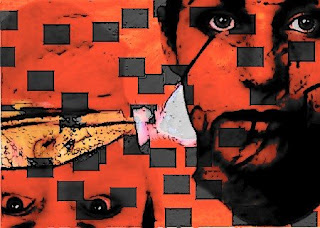
RedFaced

Sunday, March 8, 2009
Birds Still

Down By the Sea
Here is a quick ArtRage that reminded me of the sea. I added some birds. They seem to be in the shade under a structure looking at each other with the sea in the background. No blends this time. I need to take a break from that feature in ArtRage for a while.
Thursday, January 8, 2009
Bird Man Lightened

Bird Man
Did this one in ArtRage a week or so ago, but I didn't think it was done. I realized that I only had to auto correct the image to lighten it to make it better. I like the painterly background and the charcoal textures in the face. The face needed the white around it for contrast.
Wednesday, December 24, 2008
Shadow Birds
 Shadow Birds 1 & 2
Did these two a while ago, but I forgot to put them up here. I like the use of blends in these two. The second one reminds me of Victorian Valentine cards for some reason.
Saturday, December 13, 2008
Twins

Twins
Here is a quick ArtRage that doesn't seem done to me yet. For now I will take some time and add to it tomorrow. I haven't had much time these days to work on any art. Christmas break is coming soon.
Friday, November 28, 2008
Another Blend With ArtRage

Bird Girl

Bird Girl Screen Capture
I am still at it with the blend modes in ArtRage. Been away for a while, but thought I would try my hand at it again. I must not be done since this one came out looking much like the others. I like the whiteness of the bird's head in this one -- a bit of a gull-look to it.
Tuesday, October 21, 2008
Expressionistic Blends

Sunday, October 19, 2008
Robots

Pale Robot Girl

Robot Girl
Still experimenting with the blend modes in ArtRage. Reminds me of my first experiments where I had one face good and the other evil (Dark and Light, Aug 08).
Friday, October 17, 2008
Reversal Blends in ArtRage

Reverse

Blue Reverse
Played around with Blending Modes again. This time I used the Difference mode in layers for the face. I duplicated the face and added another blend on top. Not sure off hand which ones are layered for "Reverse." I think I will be experimenting some more with layered blends when I have the time.
The marks on these two are from the ArtRage that I worked on this last Friday. I used just the background "Tartan" without the face and butterfly to add textures to these two. There is also an under layer made with tube paint feature that I "smashed" down a bit with the marker tool.

Blue Reverse
Played around with Blending Modes again. This time I used the Difference mode in layers for the face. I duplicated the face and added another blend on top. Not sure off hand which ones are layered for "Reverse." I think I will be experimenting some more with layered blends when I have the time.
The marks on these two are from the ArtRage that I worked on this last Friday. I used just the background "Tartan" without the face and butterfly to add textures to these two. There is also an under layer made with tube paint feature that I "smashed" down a bit with the marker tool.
Monday, October 13, 2008
Tech Look

Tartan
Tech 
Here are a couple of ArtRage works that I experimented with this evening. There are many layers, some with different blending modes. I like the way the reds glow. I added the butterfly and face from some of my earlier work. The butterfly is in an under layer in normal mode. The face is in shadow mode with a little bit of light color in the under layer so the eyes show.
Wednesday, September 17, 2008


Sunday, September 14, 2008
Abstract Form

Form
Layering again. Abstract again. This time the colors are more muted. Textures are more apparent. I see some inner body stuff. My dog is sick, so maybe I am thinking about the internal workings of the body. Inner landscape?
Layering again. Abstract again. This time the colors are more muted. Textures are more apparent. I see some inner body stuff. My dog is sick, so maybe I am thinking about the internal workings of the body. Inner landscape?
Friday, September 5, 2008
Watercolor Effects With ArtRage

Abstract Landscape
Here I tried to achieve the look of a watercolor with ArtRage software. I used the oil paint by turning the settings to thin and lowering the pressure. There are multiple layers, one of which is a black. The dark under layer made the reds and blues near the center of the composition darker.
Subscribe to:
Posts (Atom)
About Me

- Dismagartist_ Rebecca_Moore
- This blog is a place to show artwork created with ArtRage software. The earliest art was created using Disney's Magic Art Studio software. To download ArtRage go to http://www.artrage.com/